

Quick and Easy LKR Deposits via iPay
iPay allows you to easily transfer funds directly from your mobile wallet or bank account. Follow these 4 simple steps to complete your deposit using the iPay app.
Step-by-Step Deposit Instructions
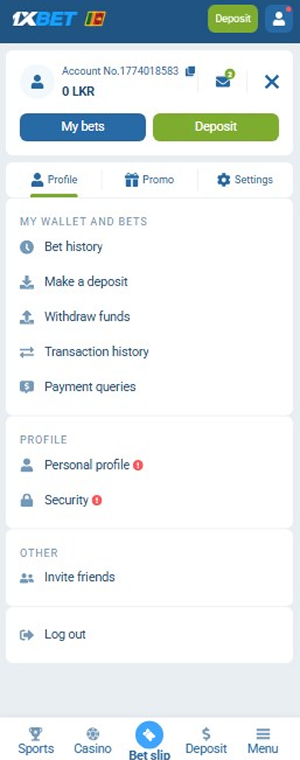
✅ Step 1: Open the Deposit Menu
Log in to your account, open the main menu, and tap the green ‘Deposit’ button (or select ‘Make a deposit’ under My Wallet).
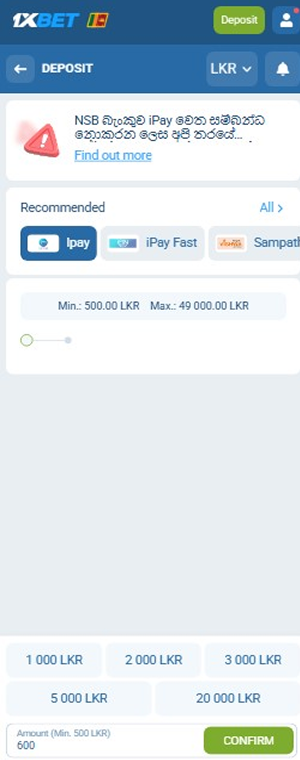
✅ Step 2: Choose iPay and Set Amount
Select iPay under the Recommended payment methods. Choose a preset amount (1 000, 2 000, 5 000 LKR, etc.) or enter a custom amount (Min: 500 LKR / Max: 49 000 LKR), then tap ‘CONFIRM’.
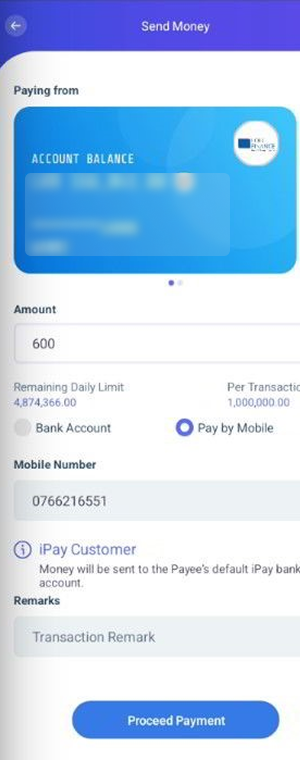
✅ Step 3: Transfer Money via the iPay App
Open your iPay app and select ‘Send Money’ → ‘Pay by Mobile’. Enter the payee’s mobile number provided on the site screen, input the exact deposit amount, and tap ‘Proceed Payment’.
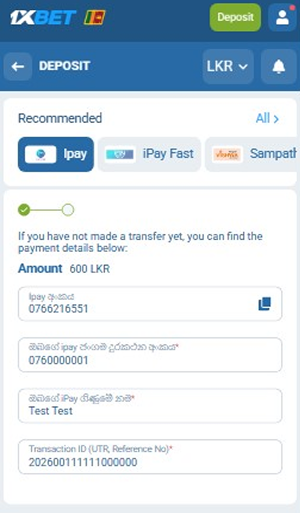
✅ Step 4: Submit Reference Details
Return to the deposit page on the website. Fill in:
-Your iPay Phone Number
-Your iPay Account Name
-The Transaction ID (UTR / Reference No) from your iPay payment receipt Then tap ‘CONFIRM’ to complete the transaction.
⚠️ IMPORTANT DEPOSIT RULES:
-Always check the current payee mobile number on the deposit screen before making a transfer, as payment details may update.
-Double-check your Transaction ID (UTR) before clicking Confirm to ensure instant auto-crediting to your balance.